

TURN ON AN ONN TV WITHOUT THE REMOTE
How to Turn On an onn TV Without the Remote
An onn Roku TV has one button under the badge. A short press wakes it; your phone handles everything after that.
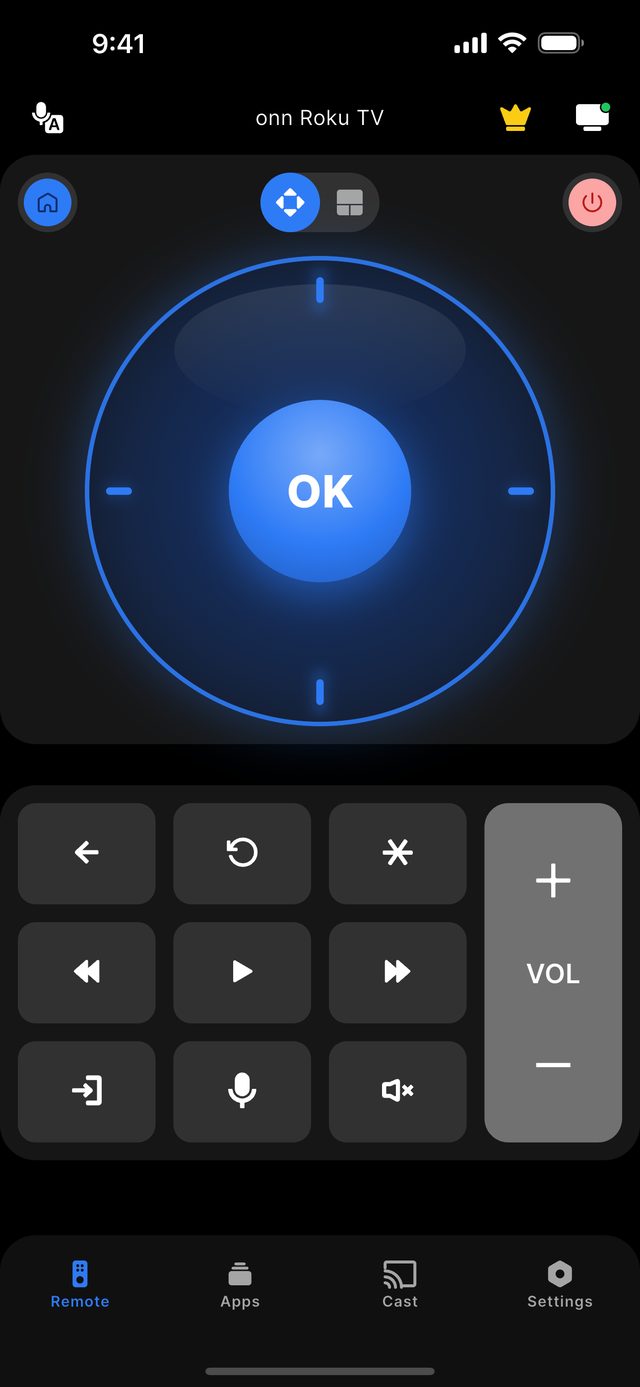
To turn on an onn TV without the remote, press the single button under the onn badge at the bottom of the screen. On onn Roku TVs a short press turns the set on or brings up the input list, and a long press turns it off. Once the television is on and connected to Wi-Fi, open Remote for onn TV on a phone on the same network and tap the TV — an onn Roku TV connects with no code. The app then replaces the remote for navigation, volume and channels.
onn Roku TVs follow the Roku convention of one physical control instead of a row of buttons. That single button does three jobs depending on how you press it: a short press powers the set on, a short press while it is on opens the input list, and a long press powers it off. It is easy to miss because it sits on the underside, directly below the badge.
A phone cannot do that first press for you. A remote app talks to the television over your home Wi-Fi, so it needs the set to be powered and on the network. The Power button inside the app is a Premium feature that works for a TV the phone is already connected to; we do not promise it will wake an onn TV that is fully off, because that depends on the set staying on the network while it sleeps.
If the TV has also lost its Wi-Fi connection, the network menu needs either a remote or a phone — and the phone cannot connect until the TV is online. The way out of that loop is a wired Ethernet cable, which carries an onn Roku TV through setup without a remote or a Wi-Fi password. After that the phone connects normally.
Not sure which model you own? Start with the onn platform guide, or read what the app does on the features page.
The facts for this model family
The onn TV button: what each press does
| onn TV | Button | Short press | Long press |
|---|---|---|---|
| onn. Roku TV, TV off | Single button under the badge | Turns the TV on | — |
| onn. Roku TV, TV on | Single button under the badge | Opens the input list | Turns the TV off |
| onn. Google TV models | Single button or small row, underside | Varies by production run | Varies by production run |
- Where the button is
- Underside of the frame, directly under the onn badge
- Short press
- Power on — or the input list if the TV is already on
- Long press
- Power off
- onn Google TV sets
- A single button or a small row on the underside; behaviour varies by production run
- Off Wi-Fi and no remote
- Use an Ethernet cable to get through setup, then connect the phone
- Power from the phone
- Premium, and only for a TV already on Wi-Fi and connected to the app
Step by step
Step by step: Turn On an onn TV Without the Remote.
Each step takes seconds. No account is needed — only your phone, the same Wi-Fi as the TV, and a code if your model shows one.
-
Find the button under the badge
Feel along the underside of the frame directly below the onn logo. There is one button on Roku models.
-
Short-press to power on
Press once and release. Wait for the home screen before doing anything else.
-
Make sure the TV is on Wi-Fi
If it was already on your network, carry on. If not, plug in an Ethernet cable so the set can finish setup without a remote.
-
Connect your phone
Open Remote for onn TV on the same Wi-Fi and tap the TV. An onn Roku TV connects with no code; an onn Google TV device shows a 6-digit code once.
-
Use the phone as the remote
Arrows, OK, volume, channels and the number pad are free. Power, Home and Back are Premium and start with a 3-day trial.
Common questions
Turn On an onn TV Without the Remote — your questions answered.
Where is the power button on an onn Roku TV?
How do I change the input on an onn TV without a remote?
Can my phone turn on an onn TV that is completely off?
My onn TV is off Wi-Fi and I have no remote — what now?
Is turning the TV off from the app free?
Get the app
Put your onn. TV remote on your phone.
Remote for onn TV finds your TV on Wi-Fi and connects the way your model expects. Roku-based onn. TVs and players connect without any code. onn. Google TV devices show a 6-digit code on the screen the first time you connect. Navigation, volume and channels are free; Premium adds Power, Home and Back.

iPhone version: in App Store review — available on Google Play now.
An independent app by Auxility, Inc. Not affiliated with, endorsed by, or sponsored by Walmart. onn. is a trademark of Walmart Apollo, LLC, used only to indicate device compatibility. Roku is a trademark of Roku, Inc.; Google TV and Android TV are trademarks of Google LLC.
Keep exploring